Apiary management app
Manage your apiaries quickly and simply, without taking your gloves off
StylHive keeps the record book for your hives: inspections, treatments, feeding, harvests, queens, and the livestock register. Everything is designed so that you can do the inspection at the open hive, phone in hand.
- Made for the apiary. Easy to read in bright sunshine, large buttons, not a single letter to type. With gloves on, you use StylHive with a stylus costing a few pounds; with bare hands, just your fingertips.
- No signal needed. No signal at your apiaries? Not a problem: all your hives are in the app. What you record is sent and backed up as soon as the phone picks up a signal again.
- Lightning fast. A hive inspection is recorded in twenty seconds. It’s saved, you can forget about it: on to the next one.
Try the demo Create my account Get it on Google Play
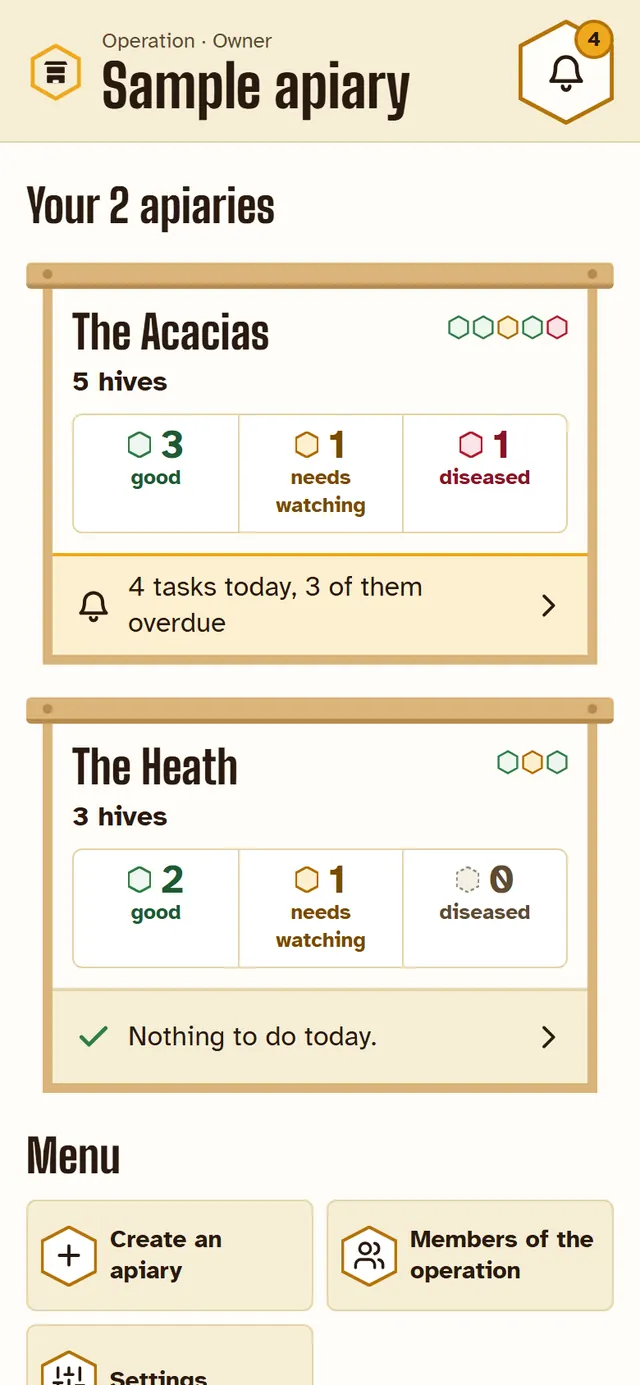
Free, with no adverts. One hive or a thousand, hobbyist or professional. The demo opens a sample apiary, with no account.
The Android app is on Google Play: it opens even with no signal. StylHive is also on the web, on any phone, iPhone included: open it at home before you set off, and leave it open; at the apiary, it manages without a signal.
- Works without a signal
- A hive inspected in 20 seconds
- Supers, feeding, treatments, harvests
- Livestock register kept automatically
- Automatic reminders: treatments, supers, inspections
- “Bright sun” mode
- Works with gloves on, using a stylus
- One operation shared between beekeepers
- Queens and their marking colours tracked
- Season reports and Excel export
- Six languages
- Data hosted in France
- Free, with no adverts
A day with StylHive
From the morning notification to the end-of-season register.
8 am · every morning
StylHive lets you know
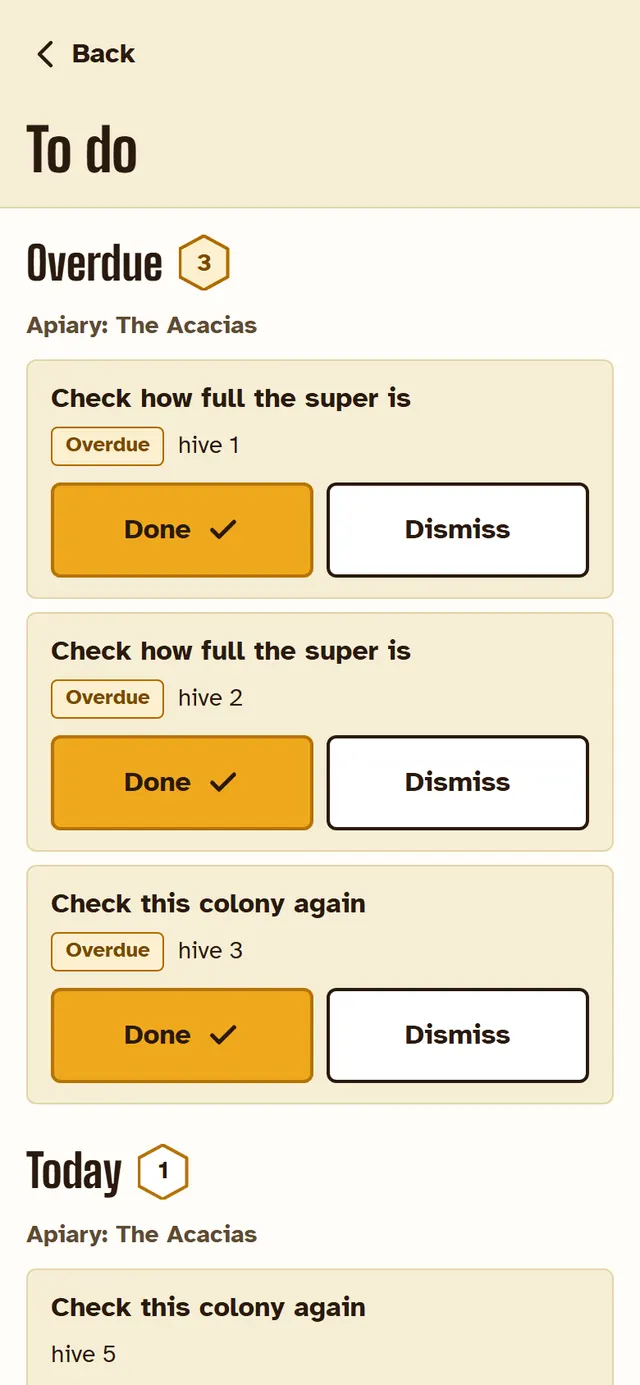
At 8 am, the Android app sends you a notification: what needs doing today, apiary by apiary. Just one a day, and only when there is something to do; you can change the time. On the web, the same list is waiting for you under “To do”.
The reminders come from your previous inspections, the leaflets for your treatments, your climate, the altitude of your apiaries… For example:
- removing a treatment, on the date given in its leaflet;
- checking how full a super is, how much of a feed has been taken down;
- checking a new queen’s laying, the queen cells in a split;
- going back to a colony that needs watching, a hive that hasn’t been inspected for a long time;
- keeping an eye out for the Asian hornet: the reminder comes later for an apiary at altitude or in a cool climate than for a lowland apiary in the South of France.
Each reminder can be switched on or off, its timing adjusted, and you can write your own. A task done: “Done”; no longer needed: “Dismiss”.
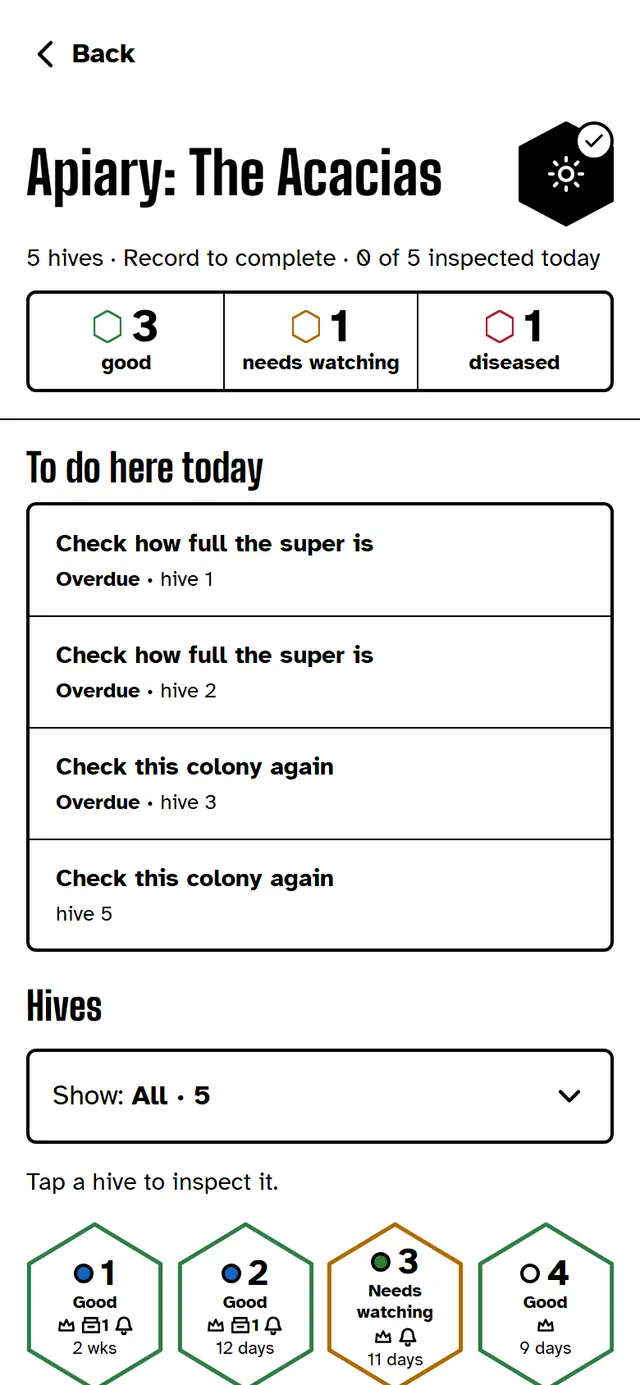
9 am · at the ‘Les Acacias’ apiary, not a single bar of signal
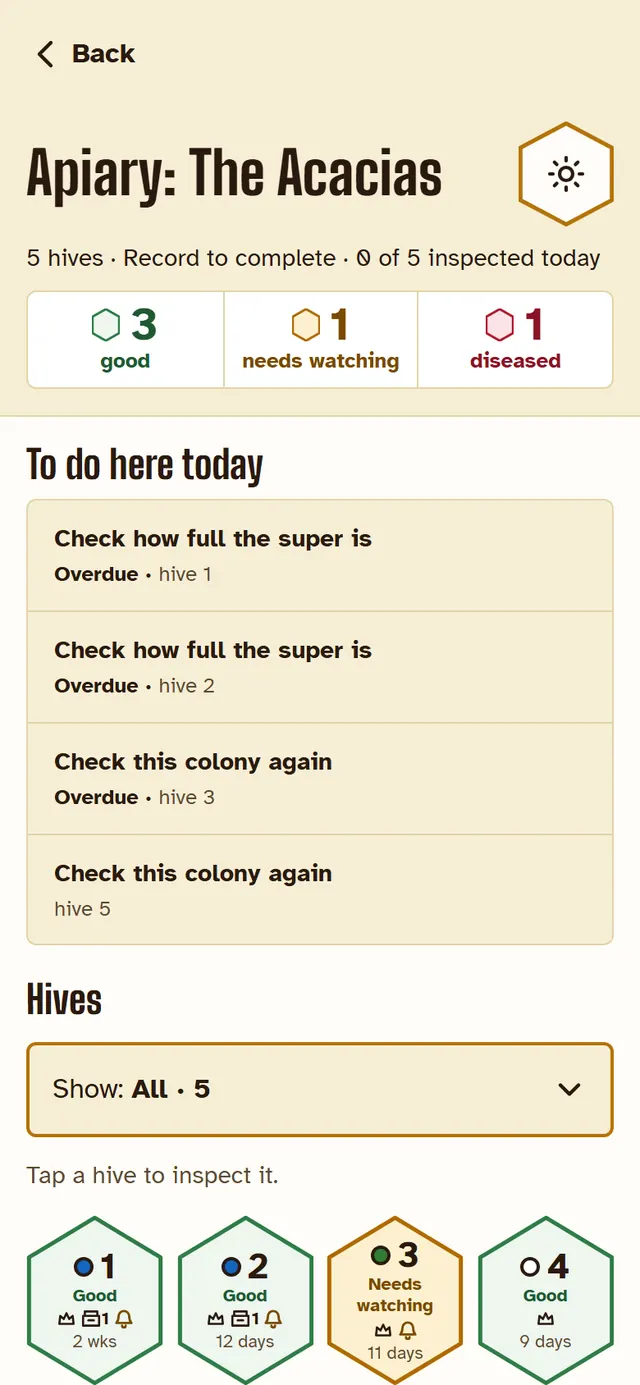
The whole apiary in your hand
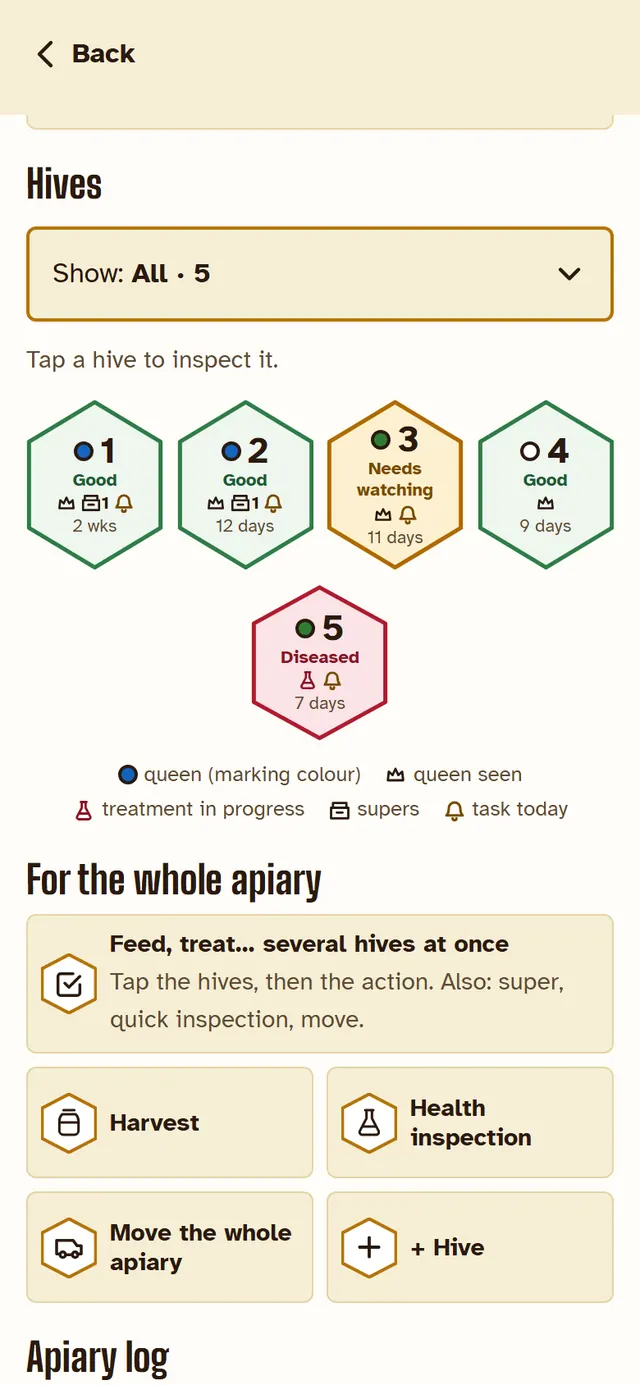
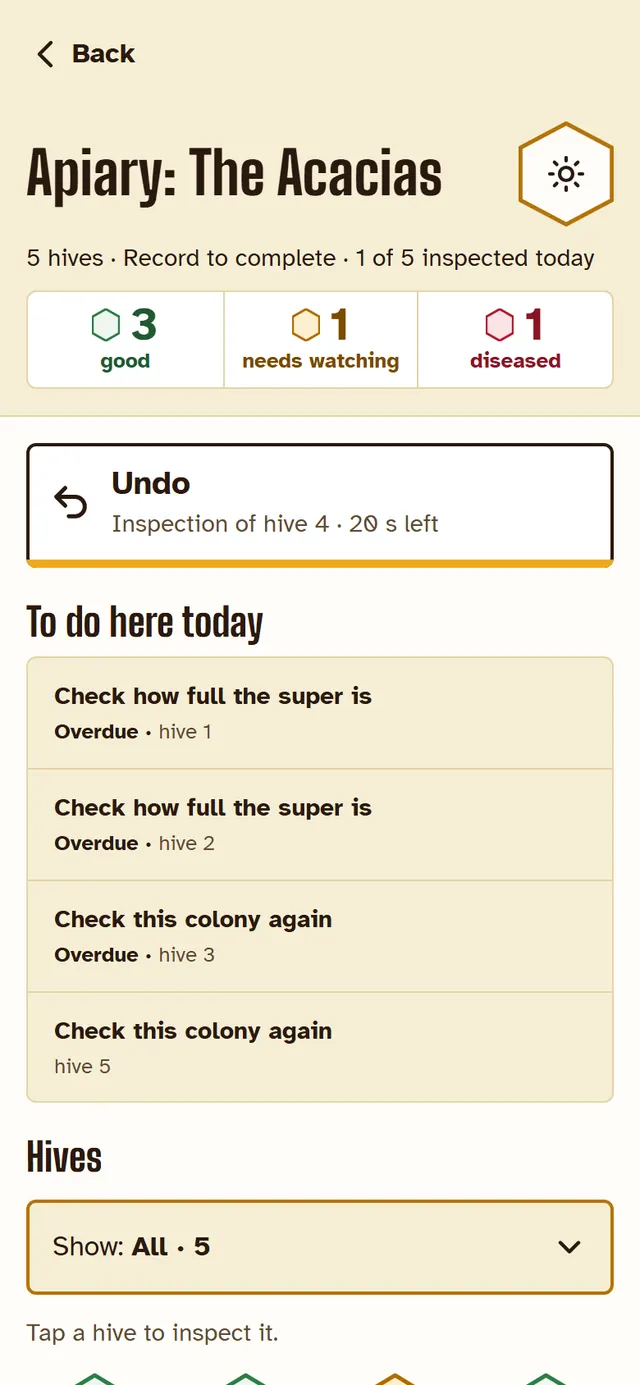
No signal on the phone? It doesn’t matter: your apiaries, your hives and their history are already on it. Today’s tasks at the top, the hives below; every state carries its word, not just a colour.
The “Bright sun” button boosts the contrast when the screen becomes unreadable. And the screen stays on from one hive to the next.
What you record without a signal stays on the phone, and goes off by itself as soon as the signal comes back: you don’t have to do a thing.
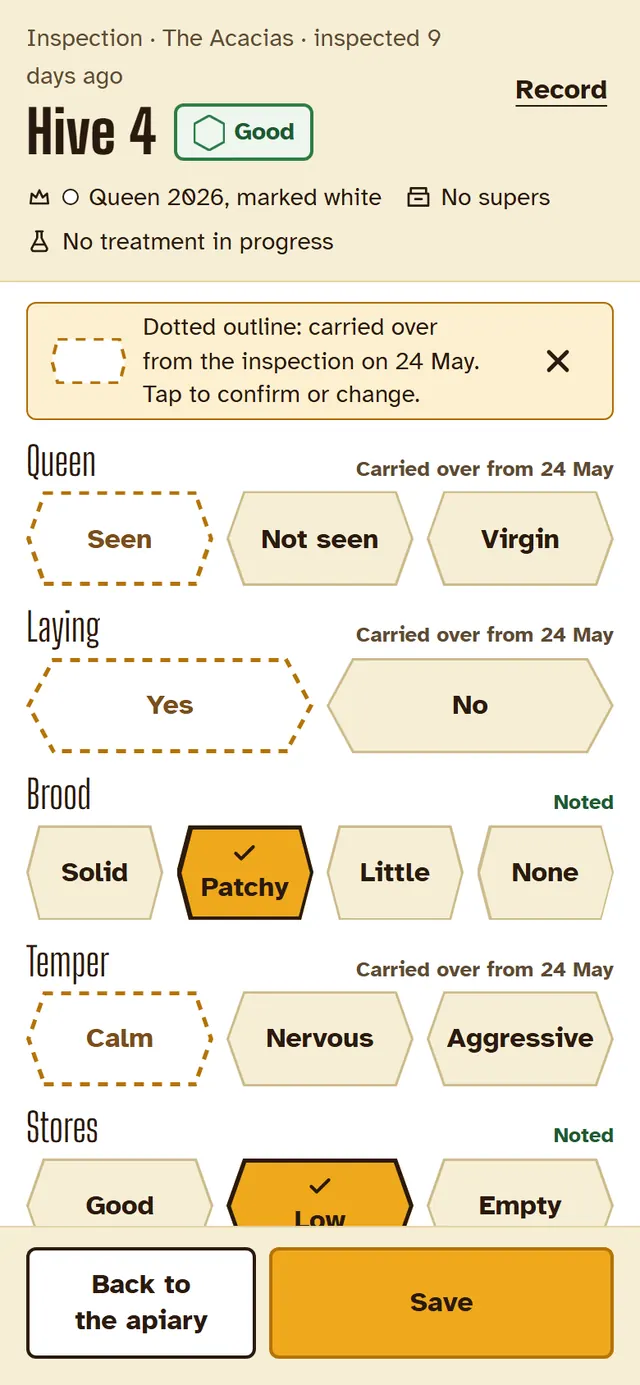
9.05 am · hive 4
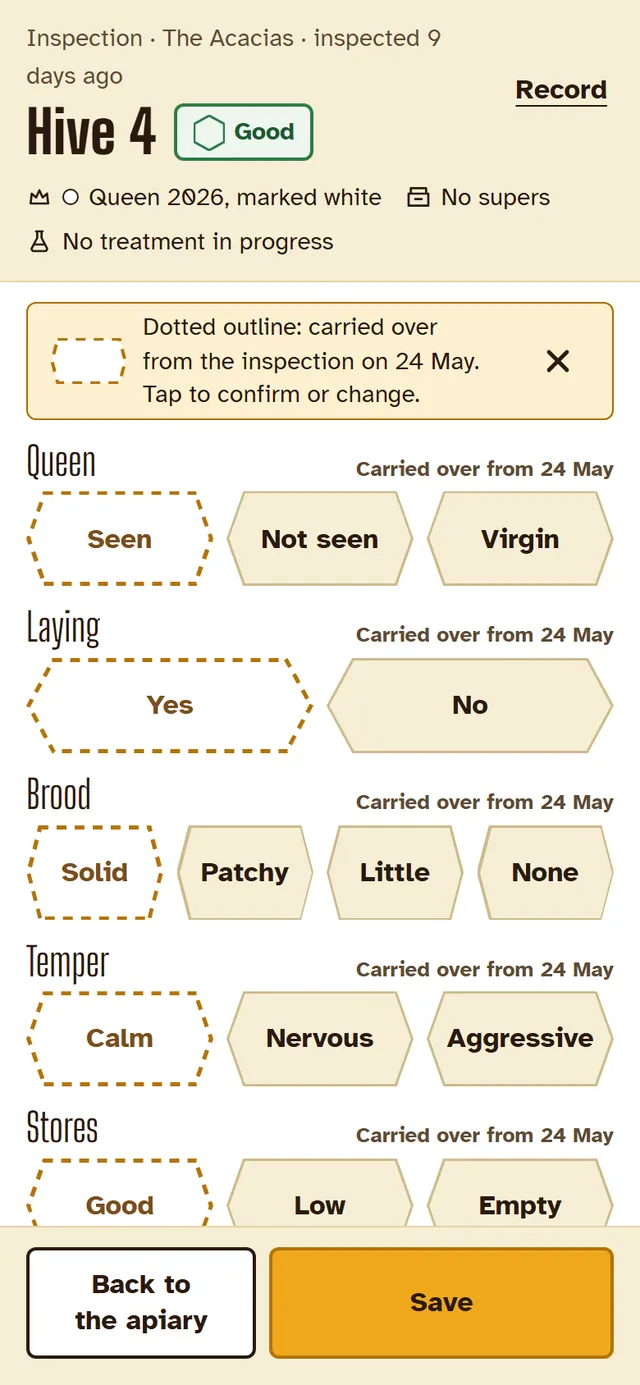
The inspection, question by question
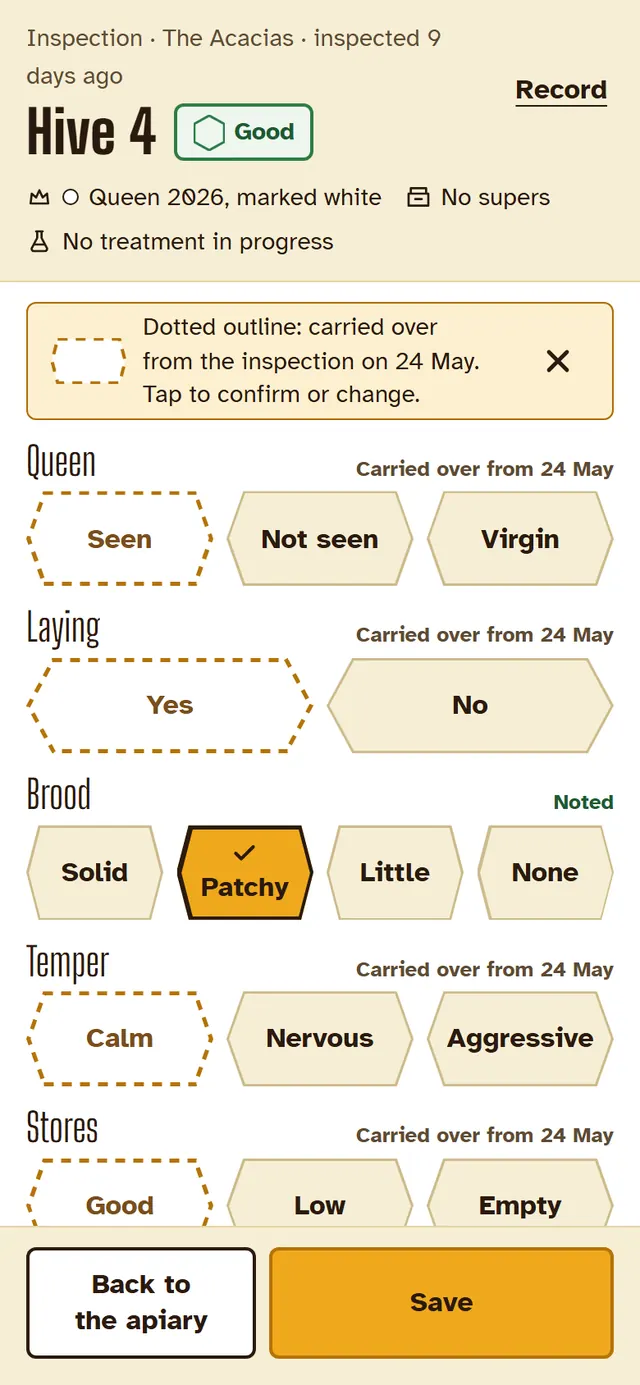
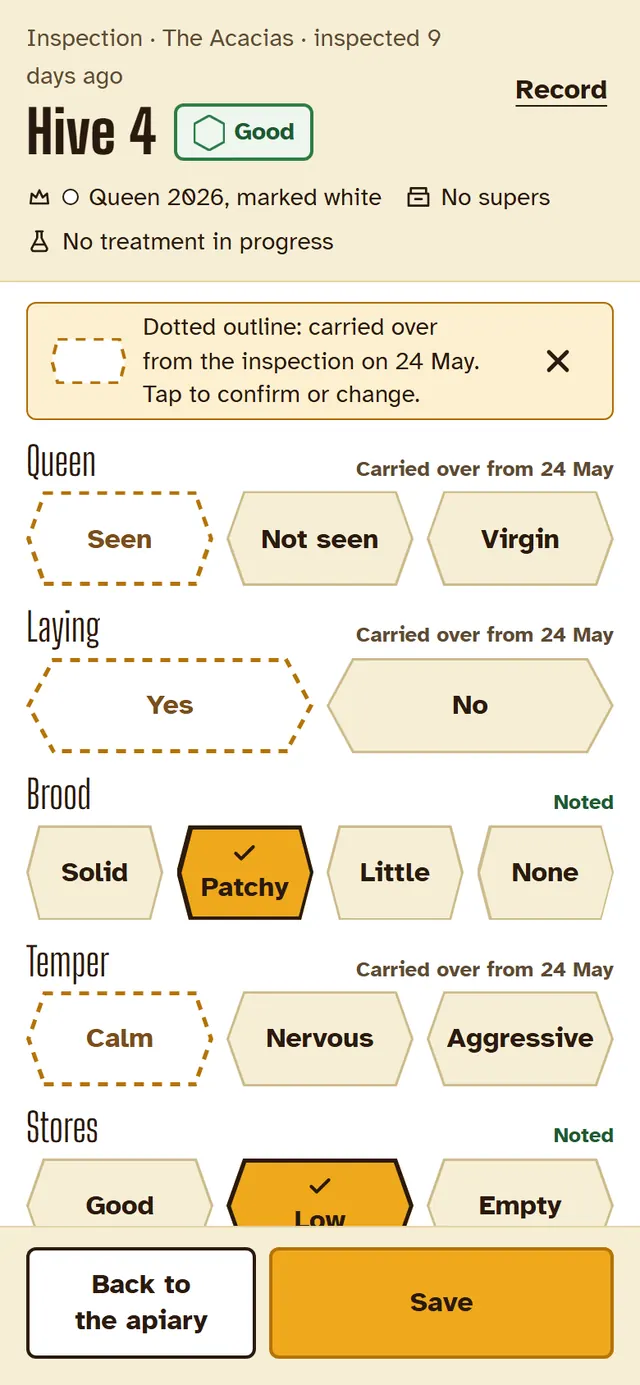
Tap the hive on the grid, and the inspection opens. One row per question: queen, laying, brood, temper, stores, colony condition. What you recorded last time is shown with a dotted outline: you only tap what has changed, then save. Twenty seconds, and on to the next one.
- Whatever needs doing, you do it from the inspection: add a super, feed, treat, harvest, requeen.
- Need to treat? The dose and duration from the official leaflet are shown, and the reminder to remove the treatment arrives on the right date.
- A hive that needs watching, or a sick one? StylHive will remind you to go back to it.
- Tapped the wrong thing? “Undo”, and nothing is lost.
4 pm · at your desk
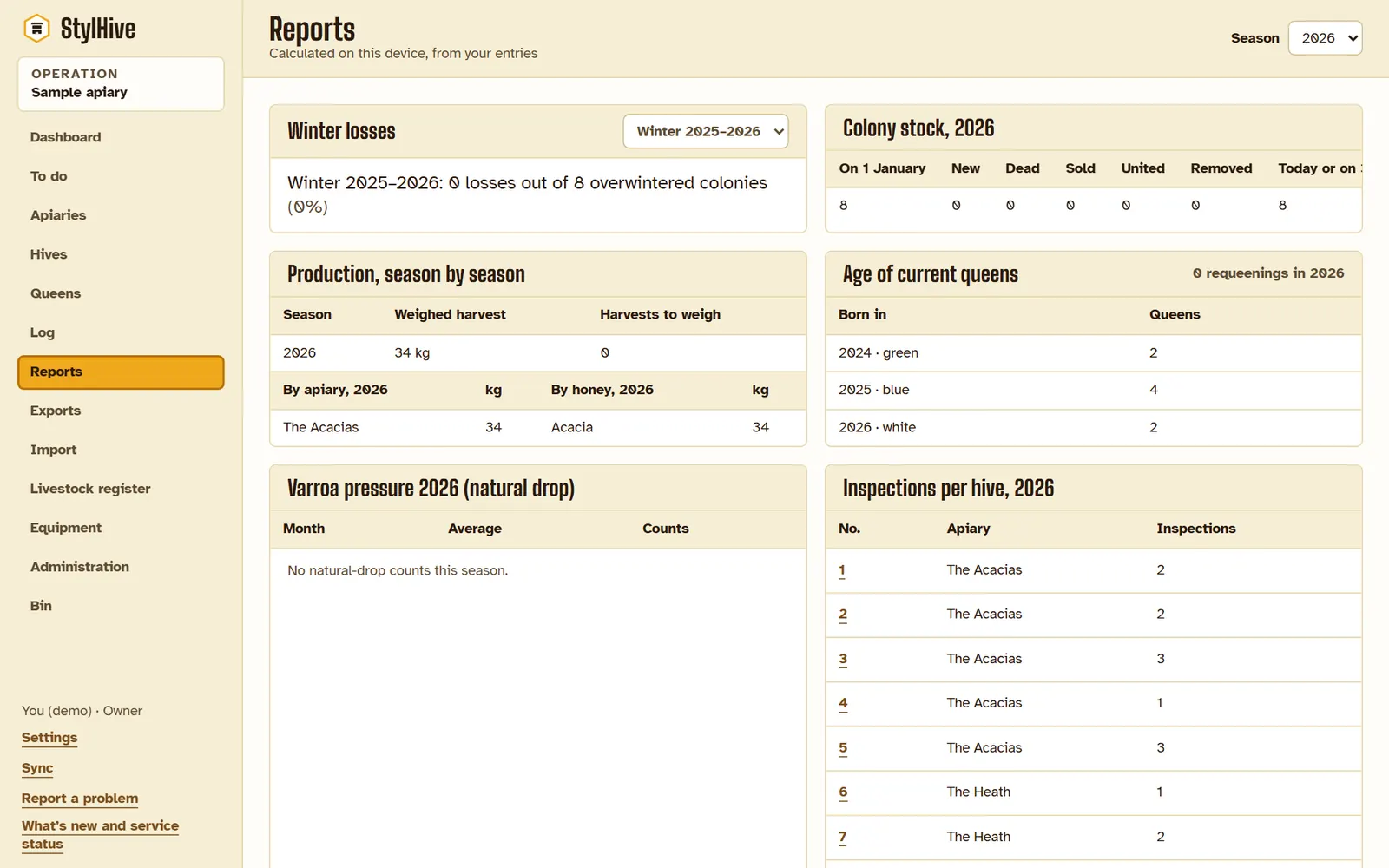
Back at your desk, everything’s ready
As soon as you get in, your data is waiting for you on the computer: what you recorded at the apiary has already come through, with nothing to copy up. Sign in at app.stylhive.com: you’ll find everything there, full-size — your apiaries and hives, your queens, each hive’s log, the weighed harvests, the winter losses — and your Excel spreadsheets, ready to download. If several of you work together, each of you sees what the others have recorded.
End of season
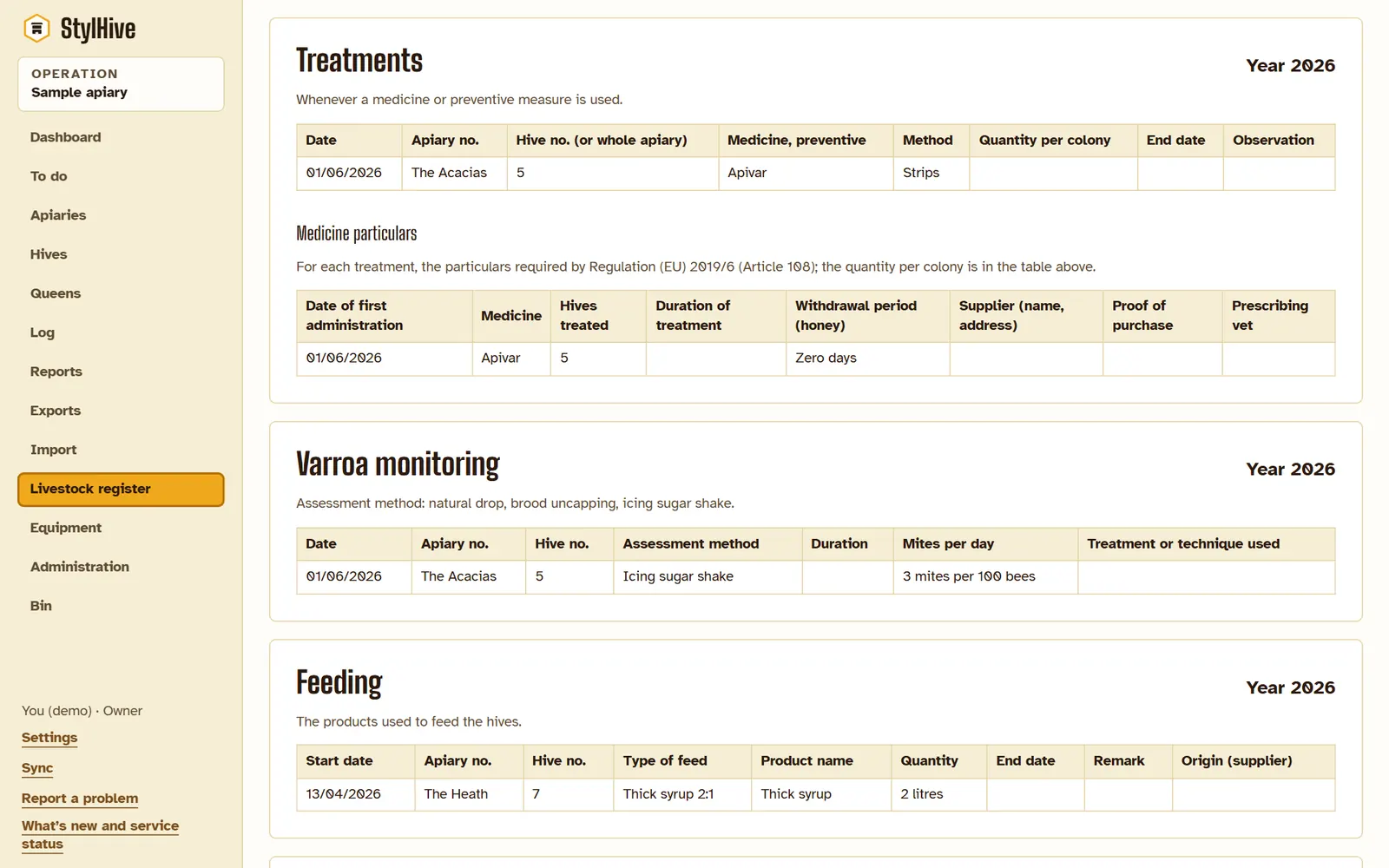
The livestock register is ready
In France and Belgium, the register (in Belgium, the treatment register) is mandatory from your very first hive, even if you don’t sell your honey. With StylHive, it fills itself in during the season: every treatment, every feed recorded at the apiary goes into it, with the particulars required by the European regulation on veterinary medicines.
You print it in the format for France or Belgium, ready for a check by the veterinary services in France, or by AFSCA, the food safety agency, in Belgium. In France, StylHive also helps you with the annual hive declaration.
What StylHive changes compared with a notebook
| With a notebook | With StylHive | |
|---|---|---|
| At the apiary | You have to write everything down on loose sheets of paper. | You enter everything, quickly, in the app. |
| Back home | You copy it up, when you remember. | It’s all already on your computer. |
| Treatments | You hunt for the leaflet, you count the weeks. | The leaflet is right in front of you, and you’re told when to act: to remove the treatment, for example. |
| The register | To fill in by hand, at the end of the season. | Filled in as the season goes: it’s ready at the end. |
| Several of you | Hard to share information. | Everyone sees what the others have recorded. |
Your questions
Do I need a signal at the apiary?
No. The Android app, on Google Play, opens even with no signal at all: what you record at the apiary stays on the phone and goes off as soon as the signal comes back. On the web, you need a signal to open it, at home before you set off; after that, leave it open: at the apiary, it works the same way.
Is it really free?
Yes: no subscription, no adverts. Your data is never sold or passed on.
I wear leather gloves
No touchscreen responds to leather: use a touchscreen stylus with a rubber tip, costing a few pounds. StylHive’s buttons are big enough for it, and the app tells you which one to choose. In nitrile gloves, your fingertips will do.
My hives are already in a notebook or a spreadsheet
Yes. On a computer, StylHive gives you an Excel template to fill in, then creates all your apiaries and hives in one go, queens included. From a notebook, it’s just as quick: an apiary takes a minute to create, with all its hives at once, numbered; you record the state of each hive at the first inspection.
Several of us on the same hives?
Yes. You invite whoever you like, and you choose what they can do: record inspections with you, or just look. Running the operation stays in your hands. Each of you sees what the others have recorded, and each of you has StylHive in your own language, out of six.
Who can see my apiaries?
You, and the people you share them with. The data is hosted in France, in Paris. Our support only looks at your data if you allow it, and never at where your apiaries are.
I only have a few hives — is it worth it?
It’s with just a few hives that you forget the most: when did the strips go in, which queen is from which year. And the register is the same whether you have 3 hives or 300.
And if StylHive shuts down one day?
You lose nothing: your data can be exported to Excel and your register printed, at any time. Keep a copy at the end of the season. And you can delete your account whenever you like.
On iPhone?
Yes, via the web: open app.stylhive.com in the iPhone’s browser, without going through the App Store. An iPhone app, which will work with no signal like the Android one, is planned.
Try it with a sample apiary
No account, nothing to install: the demo opens in your browser, with two apiaries and eight hives. Nothing you do in it leaves your device, and it can all be erased with one button.
Try the demo Create my account
On the web: app.stylhive.com. On Android: Google Play.